GPT Image 2 / 2.5 / 2.6 Image Editing API
¶ 1. Get API Key
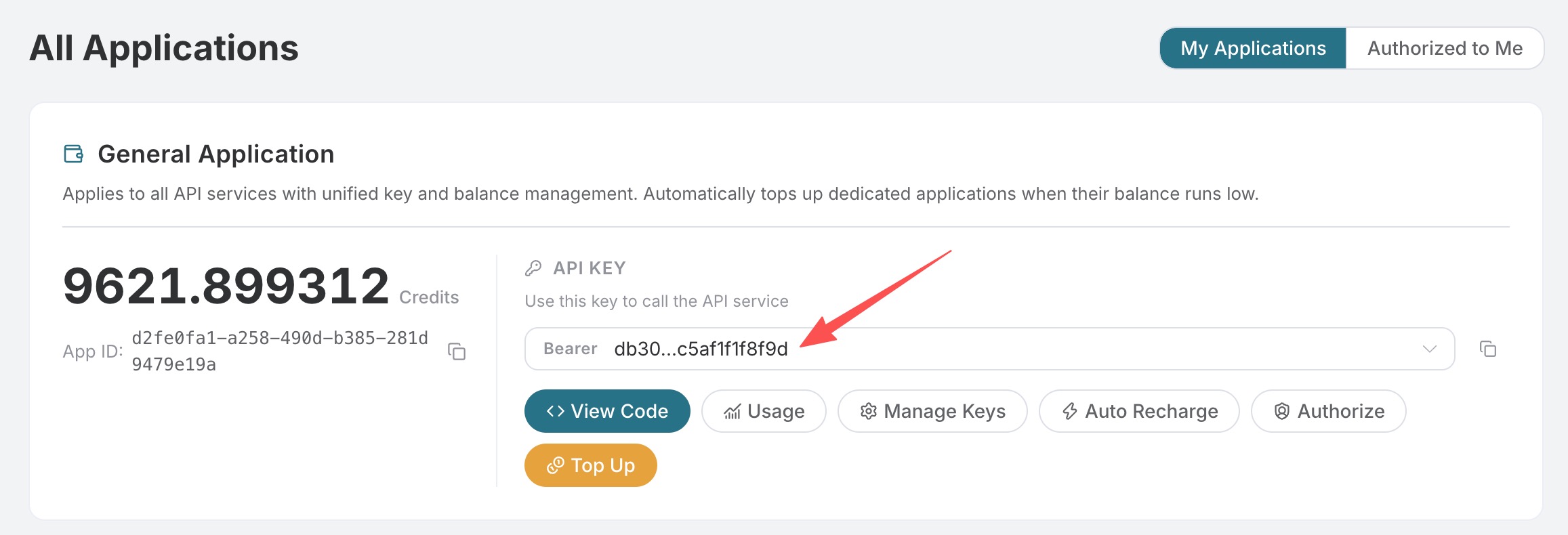
Open the 华烁云 application list, enter an available application, and copy the API Key.
¶ 2. Edit Using an Image URL
Original image:

curl https://hsyunapi.hszl-bd.cn/openai/images/edits \
  -H "Authorization: Bearer 你的 API Key" \
  -H "Content-Type: application/json" \
  -d '{
    "model": "gpt-image-2",
    "image": "https://cdn.acedata.cloud/assets/examples/gpt-image/d56455e2-e7f7-4bcd-b935-475b0a1e0948_0-18240dc44b9c.png",
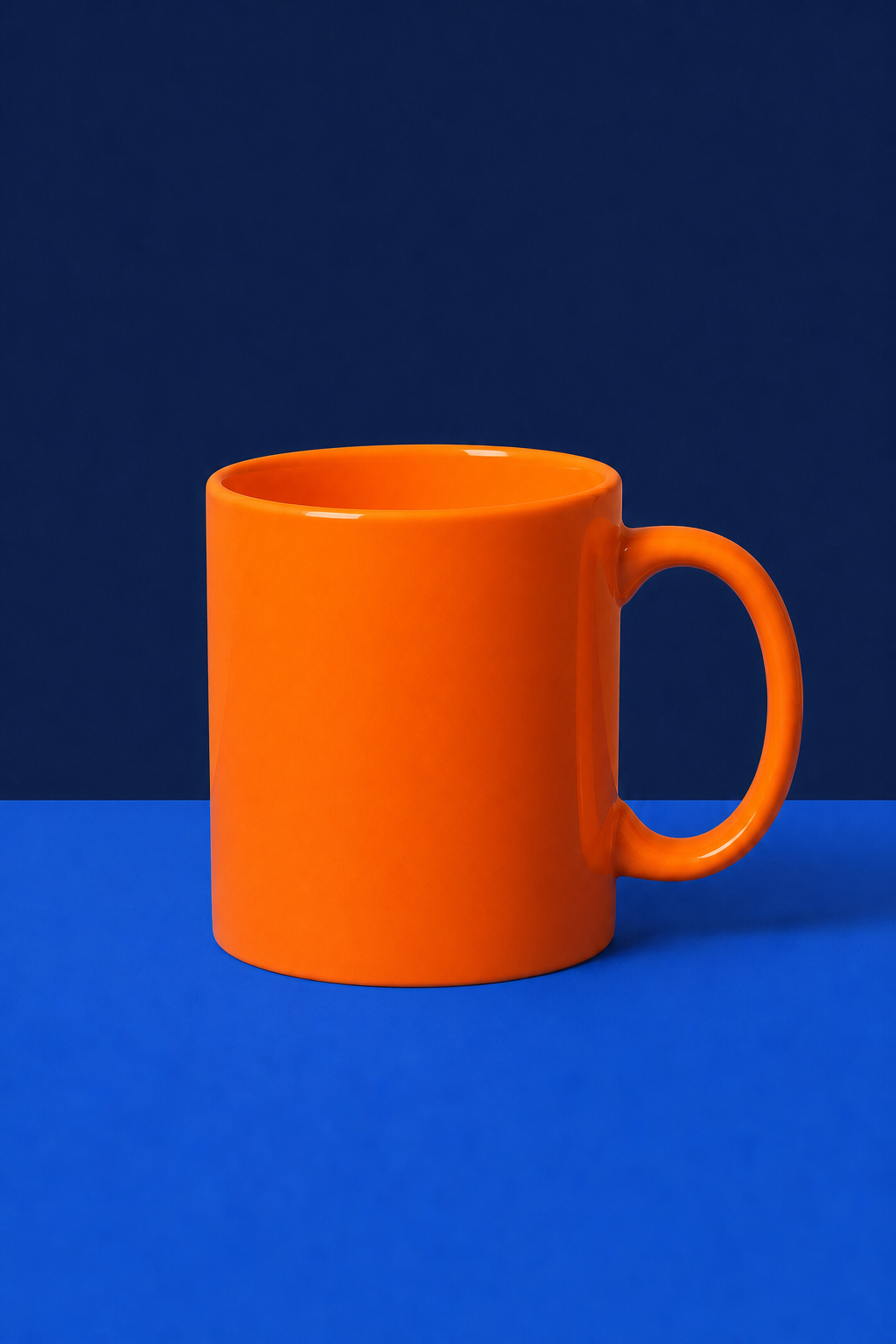
    "prompt": "Keep the mug, tabletop, camera angle, portrait layout, and soft shadow unchanged. Change only the mug color from white to vivid orange and the pale cream background to solid dark navy blue. No text and no logo.",
    "size": "1024x1536"
  }'
Successful response:
{
  "success": true,
  "task_id": "49848451-c624-4df9-9dc2-494018daaf4c",
  "trace_id": "5ac021c2-2891-4eed-bfcf-4c6668ac1be1",
  "created": 1788831893,
  "model": "gpt-image-2",
  "data": [
    {
      "url": "https://cdn.acedata.cloud/assets/examples/gpt-image/49848451-c624-4df9-9dc2-494018daaf4c_0-b6d780a732ca.png"
    }
  ],
  "usage": {
    "input_tokens": 775,
    "output_tokens": 1372,
    "total_tokens": 2147
  }
}
This is the editing result actually completed through 华烁云 on September 8, 2026. The mug was changed to orange, the background was changed to dark navy blue, and the original composition and 1024×1536 size were preserved:
¶ 3. Upload a Local Image
Use multipart/form-data:
curl https://hsyunapi.hszl-bd.cn/openai/images/edits \
  -H "Authorization: Bearer 你的 API Key" \
  -F "model=gpt-image-2" \
  -F "image=@input.png" \
  -F "prompt=Replace the background with a bright modern studio"
You can pass image repeatedly. The GPT Image series supports up to 16 reference images. The image in JSON requests can be a single URL or an array of URLs; local files are uploaded using multipart.
¶ Models and Billing Methods
| Model | Applicable Scenario and Billing Method |
|---|---|
gpt-image-2 |
Default reverse channel, fixed billing per successfully generated image |
gpt-image-2:reverse |
Explicitly selects the reverse channel, fixed billing per successfully generated image |
gpt-image-2:official |
Official API channel, higher stability, billed by actual Token usage |
gpt-image-2.5-flare |
Focuses on generation speed, fixed billing per successfully generated image |
gpt-image-2.6-flare |
Focuses on generation speed, fixed billing per successfully generated image |
gpt-image-2.5-flare:reverse |
Explicit reverse alias, equivalent to gpt-image-2.5-flare, fixed billing per successfully generated image |
gpt-image-2.6-flare:reverse |
Explicit reverse alias, equivalent to gpt-image-2.6-flare, fixed billing per successfully generated image |
gpt-image-2.5-flare:official |
Official API channel, higher stability and focuses on generation speed, billed by actual Token usage |
gpt-image-2.6-flare:official |
Official API channel, higher stability and focuses on generation speed, billed by actual Token usage |
gpt-image-2.5-sunburst |
Focuses on high fidelity and fine-grained control, fixed billing per successfully generated image |
gpt-image-2.6-sunburst |
Focuses on high fidelity and fine-grained control, fixed billing per successfully generated image |
gpt-image-2.5-sunburst:reverse |
Explicit reverse alias, equivalent to gpt-image-2.5-sunburst, fixed billing per successfully generated image |
gpt-image-2.6-sunburst:reverse |
Explicit reverse alias, equivalent to gpt-image-2.6-sunburst, fixed billing per successfully generated image |
gpt-image-2.5-sunburst:official |
Official API channel, higher stability and focuses on high fidelity and fine-grained control, billed by actual Token usage |
gpt-image-2.6-sunburst:official |
Official API channel, higher stability and focuses on high fidelity and fine-grained control, billed by actual Token usage |
The 2.0 / 2.5 reverse models (including :reverse aliases) may use GPT Image 2.5 Flare to complete requests during automatic recovery; the requested model and the fixed billing method per successfully generated image remain unchanged.
The page prices for official API channels are estimates before the request. The final amount is based on the actual Token usage in the response and usage records.
quality supports auto, low, medium, and high; 2.5 / 2.6 Flare and Sunburst (including :reverse and :official variants) additionally support xhigh and max. This field can be passed for both JSON image URL editing and multipart file editing; official channels are billed by actual Token usage.
¶ 4. Use a Mask for Local Editing
The official Images Edit API specifies the areas allowed to be modified through mask. 华烁云's :official models follow the same multipart contract:
maskmust be a PNG with an Alpha channel and must not exceed 4MB;- The mask dimensions must exactly match the first
image; - Transparent pixels with an Alpha value of
0indicate areas allowed to be edited, while non-transparent pixels indicate areas that should be preserved; - RGB images that are only black and white but have no transparent channel cannot be used as valid masks;
- The prompt should describe the complete desired image, while clearly specifying the local modifications and the content that needs to remain unchanged.
First, generate a mask from the original image below. The example makes the central rectangle transparent, allowing the model to modify only that area:
from PIL import Image, ImageDraw

source = Image.open("input.png").convert("RGBA")
mask = Image.new("RGBA", source.size, (0, 0, 0, 255))
draw = ImageDraw.Draw(mask)
width, height = source.size
draw.rectangle(
    (width // 4, height // 4, width * 3 // 4, height * 3 // 4),
    fill=(0, 0, 0, 0),
)
mask.save("mask.png")
Then upload the original image and the mask together:
curl https://hsyunapi.hszl-bd.cn/openai/images/edits \
  -H "Authorization: Bearer Your API Key" \
  -F "model=gpt-image-2:official" \
  -F "image=@input.png" \
  -F "mask=@mask.png" \
  -F "prompt=Keep the composition, lighting, and all objects outside the transparent mask unchanged. Inside the masked area, replace the empty tabletop with a small blue ceramic vase."
You can also continue using the images.edit calling method of the official OpenAI Python SDK; you only need to point base_url to 华烁云:
from openai import OpenAI

client = OpenAI(
    api_key="Your API Key",
    base_url="https://hsyunapi.hszl-bd.cn/openai",
)

with open("input.png", "rb") as image, open("mask.png", "rb") as mask:
    result = client.images.edit(
        model="gpt-image-2:official",
        image=image,
        mask=mask,
        prompt=(
            "Keep the composition, lighting, and all objects outside the "
            "transparent mask unchanged. Inside the masked area, replace "
            "the empty tabletop with a small blue ceramic vase."
        ),
    )

print(result.data[0].url)
When using mask, the original image and the mask must be uploaded separately in the same multipart request through image=@input.png and mask=@mask.png. Do not pass a URL original image mixed with a local mask file; pure URL editing requests do not support attaching an additional local mask file. The mask constrains the editing area, but the generation model may still naturally blend the edges; when strict boundaries are needed, clear Alpha edges should be used and the prompt should repeatedly specify which content must remain unchanged.
The above calling method is consistent with the mask examples in the OpenAI Image Edit API and the official GPT Image Cookbook.
¶ 5. Common Parameters
| Field | Description |
|---|---|
model |
gpt-image-2, gpt-image-2.5-flare (faster), or gpt-image-2.5-sunburst (higher fidelity and control); all three can use their corresponding :official variants, and gpt-image-2 also supports :reverse |
image |
JSON uses a single URL or an array of up to 16 URLs; multipart uses one or more image file fields. Local image files must be uploaded when using mask |
mask |
Optional PNG mask, limited to multipart file uploads; must include an Alpha channel, have the same dimensions as the first image, and not exceed 4MB |
prompt |
Editing instruction |
size |
auto or a WIDTHxHEIGHT that meets the restrictions |
n |
1–10; only 1 is supported when response_format=b64_json |
response_format |
url or b64_json |
callback_url |
Optional asynchronous callback URL |
The size rules are the same as the generation endpoint: width and height must be multiples of 16, the longest side must not exceed 3840, total pixels must be 655,360–8,294,400, and the aspect ratio must not exceed 3:1. When size is omitted or auto is used, the model selects the canvas based on the prompt and the first reference image.
gpt-image-2, gpt-image-2.5-flare, gpt-image-2.5-sunburst, and their :reverse aliases are billed by the number of successfully generated images; gpt-image-2:official, gpt-image-2.5-flare:official, and gpt-image-2.5-sunburst:official are billed based on the actual Tokens for text input, reference image input, and image output, with final usage records prevailing.
¶ 6. Asynchronous Callbacks and Troubleshooting
Long-running tasks can include the following in the request:
{
  "callback_url": "https://example.com/webhooks/images"
}
The asynchronous 200 response is {"task_id": "..."}; the final result is returned through a callback after completion. Synchronous requests return created and data.
| Status | Check |
|---|---|
| 400 | Image format/count, parameter combinations, and size format; when using mask, check the PNG Alpha channel, the 4MB limit, and whether its dimensions match the first original image |
| 401 | API Key and Bearer Header |
| 429 | Request frequency |
| 504 | Switch to asynchronous callbacks |
Error responses include trace_id. Provide this ID when reporting an issue; do not provide the API Key.
For complete fields and real-time enumerations, refer to the OpenAI Images Edits API page. For pure text-to-image generation, see GPT Image 2 / 2.5 / 2.6 Image Generation.
¶ GPT Image 2.6
GPT Image 2.6 continues to use the generation, editing, asynchronous task, and billing interfaces of 2.5:
| Model | Billing |
|---|---|
gpt-image-2.6-flare / gpt-image-2.6-flare:reverse |
0.22 Credits/image |
gpt-image-2.6-sunburst / gpt-image-2.6-sunburst:reverse |
0.22 Credits/image |
gpt-image-2.6-flare:official |
Same as 2.5 official, billed by actual Token usage |
gpt-image-2.6-sunburst:official |
Same as 2.5 official, billed by actual Token usage |
Available quality options are auto, low, medium, high, xhigh, and max; use auto for size or a WIDTHxHEIGHT that meets the above constraints. This endpoint supports png, jpeg, and webp; GPT Image 2.6 additionally supports native gif animations, while SVG is not currently supported. Editing supports JSON image URLs and multipart file uploads. :reverse is an explicit alias of the regular version with the same name. Please use the full model name; do not pass gpt-image-2.6.
¶ GPT Image 2.6 Image-to-GIF Animation
GPT Image 2.6 Flare, the standard version of Sunburst, :reverse, and :official can all use output_format: "gif". Animation frames, loop information, and playback duration will be preserved; frame_count indicates the number of frames, frame_duration_ms indicates the milliseconds per frame, the frame count must be an integer from 2–16, the duration per frame must be an integer from 20–655350 milliseconds, and they are only used for GIF; encoding is rounded to the nearest 10ms. When unspecified, the default is 9 frames at 200 milliseconds per frame; when the GIF size is omitted or set to auto, the 512x512 preset is used.
It is recommended to first use size: "512x512", frame_count: 9, and frame_duration_ms: 200. GIF has separate size and frame count limits, and static 4K specifications cannot be applied directly; some models will adjust the actual output size. n indicates the number of returned GIF files, not the number of animation frames. The standard version and :reverse are still billed by the number of successful files, while the official version is billed by actual Token usage.
{
  "model": "gpt-image-2.6-flare",
  "image": "https://cdn.acedata.cloud/assets/examples/gpt-image/d56455e2-e7f7-4bcd-b935-475b0a1e0948_0-18240dc44b9c.png",
  "prompt": "Animate the mug gently moving left and right. Keep its appearance and the background, no text.",
  "output_format": "gif",
  "size": "512x512",
  "quality": "medium",
  "frame_count": 9,
  "frame_duration_ms": 200,
  "n": 1,
  "async": true
}
¶ GPT Image 2.6 4K Static Images
Flare, Sunburst, and their :reverse and :official variants can all use the aforementioned 4K pixel presets, such as 3840x2160 and 2160x3840. Both generation and editing pass specific pixels through size; 4K is not a valid size value, and 4096x4096 also exceeds the current pixel limit. The above 4K specifications apply to static PNG/JPEG/WebP; for GIF, please use its dedicated parameters.
¶ GPT Image 2.6 Composition Complexity
complexity can be low, medium, or high; when omitted, the model default high is used. It controls planning complexity and is independent of quality rendering quality; it does not incur additional per-request charges, and the official version is still settled based on actual Token usage. Other models do not support this parameter.
GIF does not support masks, markup images, custom compression, prompt rewriting, or partial image streaming output; incompatible combinations will be rejected before generation. Size, frame count, and quantity are jointly limited by the model pixel budget; 1024x1024 with 2 frames has been verified to work for standard Flare, but this conclusion cannot be extended to all 1K combinations or 4K GIFs.
¶ Markup-Guided Editing
GPT Image 2.6 static editing supports markup. Upload a transparent PNG with the same dimensions as the first reference image, circle the area to be modified on a separate layer, and specify the modification requirements in prompt. The markup layer must contain transparent pixels; each of the two images must not exceed 16777216 pixels, and the markup image must not exceed 40MB. JSON can pass an HTTPS URL, a PNG base64 data URL, or { "image_url": "https://..." }; multipart uploads the file through markup. The platform will pass the markup layer as a file. markup cannot be used together with mask, GIF, or prompt_rewriter, and does not support file_id.
input_fidelity does not apply to GPT Image 2.6; please omit it.